
CMakePresets.json and Visual Studio
After reaching a solid milestone with the graphical elements on my jigsaw puzzle game, I decided that I wanted to revisit something that is supposed to be a quality-of-life improvement for developing with C++ and CMake: CMakePresets.
What are CMake Presets?
Starting with CMake version 3.19, CMake offers support for defining build presets. This can be useful for several scenarios:
- Teams who want to share build settings. Every developer on the team will have the same build configurations available, will use the same compiler and linker toolchain, and will have the same binary directory. It helps to enforce consistency.
- To support continuous integration builds.
- To allow the developer's IDE to build any configuration directly, avoiding the need to build from the command line.
Once you have presets set up properly, your IDE should recognize them and let you configure and build against them. On the command-line, CMake offers an additional entry point for invoking yuur builds. If you have an entry under configurePresets with the name of x64-dev, for example, you can configure and build it with:
cmake --preset x64-dev
cmake --build --preset x64-dev
My Experience with Visual Studio and CMakePresets.json
I first attempted to get CMakePresets working with the SDL2 Emscripten project back in December of 2025, and ultimately gave up on it in the short term. Visual Studio simply didn't seem to be behaving, and at the time I didn't figure out why within the timeframe that I gave myself. So for Windows users, I ended up creating a set of batch files to configure and build each "configuration". This was not a particularly elegant solution, but it felt like a practical workaround in the moment.
When I finally decided to attempt this again, I started out with a fresh project that has no dependencies. C++ tends to have lengthy compile times, so trying to get CMakePresets working in a tiny build with just a single source file is much more forgiving.
The biggest problem with Visual Studio is that it exhibits a fallback behaviour as soon as it detects anything wrong in CMakePresets.json. The fallback behaviour is to define a default debug configuration, and to search for additional CMake build caches in the /out/build folder. So if you make a mistake and save the CMakePresets.json file with any kind of error, it goes ahead and starts configuring a default debug build that you don't actually want. It also resets the state of the Project and Build menus, and the toolbar, to match this fallback behaviour.
What I wish Visual Studio would do instead is maintain a copy of the most recent working version of your CMakePresets.json file, and work off of that if the current file has errors in it.
Schema Versions
As of the time of this writing, CMake has introduced 10 different versions of the CMakePresets.json schema. You typically specify the schema version you're targeting at the top of the file:
{
    "version": 9,
    "configurePresets": [
    ]
}
I'm using the latest version of Visual Studio Community 2022. It comes packaged with CMake 3.31.6, which should support schema version 10. However, trying to set it to version 10 causes Visual Studio to report an error that it only supports schema versions 2 through 9.
So another important step in creating a valid CMakePresets.json file is that your IDE itself must support the schema version, not just the version of CMake it bundles.
If your CMakePresets.json file is correct, fully compliant with the schema version you specified, and recognized by Visual Studio, the toolbar should be listing your configurations:
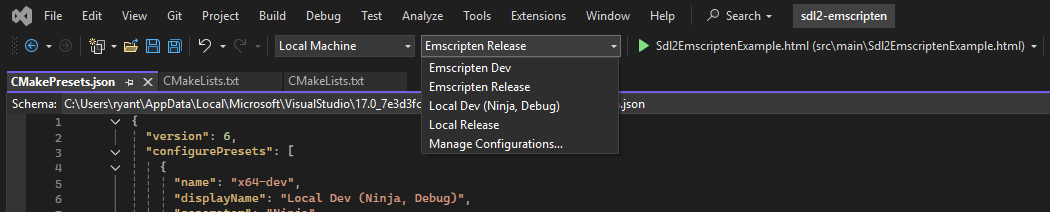
Going Forward
At the moment, I seem to have Visual Studio behaving nicely with the SDL2 Emscripten sample project. However, my level of confidence that I fully understand CMakePresets isn't high enough for me to formalize this into an article, or introduce it in a Youtube video just yet.
If you were using the SDL2 Emscripten sample as a reference for how to build your own project, then here's what I'm currently using for my CMakePresets.json file to get it to play nicely with Visual Studio:
{
  "version": 6,
  "configurePresets": [
    {
      "name": "x64-dev",
      "displayName": "Local Dev (Ninja, Debug)",
      "generator": "Ninja",
      "binaryDir": "${sourceDir}/out/build/${presetName}",
      "cacheVariables": {
        "CMAKE_BUILD_TYPE": "Debug"
      }
    },
    {
      "name": "x64-rel",
      "displayName": "Local Release",
      "generator": "Ninja",
      "binaryDir": "${sourceDir}/out/build/${presetName}",
      "cacheVariables": {
        "CMAKE_BUILD_TYPE": "Release"
      }
    },
    {
      "name": "wasm-dev",
      "displayName": "Emscripten Dev",
      "generator": "Ninja",
      "binaryDir": "${sourceDir}/out/build/${presetName}",
      "cacheVariables": {
        "CMAKE_BUILD_TYPE": "Debug",
        "CMAKE_TOOLCHAIN_FILE": "$env{EMSDK}/upstream/emscripten/cmake/Modules/Platform/Emscripten.cmake"
      }
    },
    {
      "name": "wasm-rel",
      "displayName": "Emscripten Release",
      "generator": "Ninja",
      "binaryDir": "${sourceDir}/out/build/${presetName}",
      "cacheVariables": {
        "CMAKE_BUILD_TYPE": "Release",
        "CMAKE_TOOLCHAIN_FILE": "$env{EMSDK}/upstream/emscripten/cmake/Modules/Platform/Emscripten.cmake"
      }
    }
  ]
}
At some point soon, I plan on updating the sample project to handle window resizing and toggling between windowed and fullscreen mode. I'll likely include this CMakePresets alongside it.


