
Switching to VS Code for Emscripten Projects
After a fairly sustained effort to get Visual Studio to play nicely with my Emscripten projects, I ultimately decided to switch to using VS Code. This comes on the heels of figuring out how to define a CMakePresets.json file.
I was determined to make everything work, but unfortunately I just couldn't get to that perfect place where all of the following are true:
- I can toggle between a desktop and Emscripten build in the toolbar.
- Visual Studio recognizes the
#includedefinitions for both SDL and Emscripten headers in their expected locations. - No compiler errors appear in the editor.
- The builds run as expected inside Visual Studio.
I came very close, but every avenue I tried caused at least one of the above to fail.
Emscripten Projects "Just Work" in VS Code
This is only slightly misleading. I found that I only needed to do two things for my Emscripten projects to "just work" in VS Code:
- Visual Studio Community has to be installed, so that you have the full native toolchain. VS Code finds it, and leverages it for C/C++ projects.
- The Emscripten SDK environment must be set up properly. But this would be the case for Visual Studio as well.
To get the Emscripten SDK environment set up and recognized in VS Code, you have to run the x64 Native Tools Command Prompt and run:
path\to\emsdk\emsdk_env
code
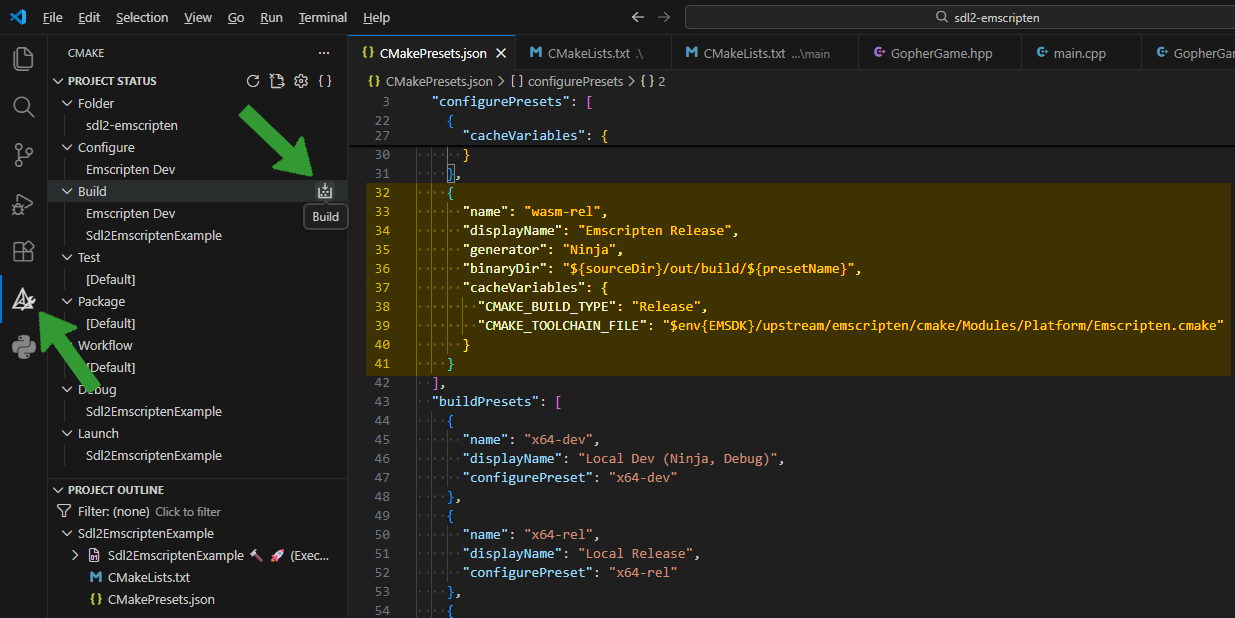
When you first choose an Emscripten build, VS Code will configure the project. I find that it takes a minute or so to build and cache all of the Emscripten ports. In the case of this sample project, that includes SDL and its dependencies (freetype, libpng, libjpeg, vorbis, etc.). So you might get some temporary compiler errors on the #include definitions. But once it's done, those will disappear.
The screenshot above shows how VS Code interprets the CMakePresets.json file, and where you have to go to build the project. There's a CMake icon in the left sidebar, and you need a buildPresets entry to access the Build icon. The important item in the configurePresets entry for an Emscripten build is the CMAKE_TOOLCHAIN_FILE entry, under cacheVariables. The portable way to make it work is to rely on the EMSDK environment variable.
Everything I Tried
If you look through the Git history in my cmake-testing-grounds repository, you can see relics of some of my attempts to get Visual Studio to co-operate with Emscripten.
The general gist of what I attempted was to create an EMSCRIPTEN_IDE_WORKAROUNDS option in the CMake build, and set it to true in the Emscripten builds in CMakePresets.json. In the build script, I added various compiler definitions and include folders in an attempt to trick Visual Studio into understanding the Emscripten environment. Every step I took, my source code got further away from what you'd expect to see in a project that wants to target both desktop and the web.
What I think a developer reasonably wants is a simple switch that says, this code block is how to do this thing for a desktop build, and this other code block is how to do this thing for a web-based build. That leads to fairly simple branching logic like so:
	SDL_Window* createWindow() {
#ifdef __EMSCRIPTEN__
		int windowWidth = 0, windowHeight = 0;
		int windowFlags = 0;
		emscripten_get_canvas_element_size("#canvas", &windowWidth, &windowHeight);
#else
		int windowWidth = 960;
		int windowHeight = 540;
		int windowFlags = SDL_WINDOW_RESIZABLE;
#endif

		SDL_Window* result = SDL_CreateWindow("Hit the Gopher!", SDL_WINDOWPOS_CENTERED, SDL_WINDOWPOS_CENTERED, windowWidth, windowHeight, windowFlags);
		return result;
	}
Anything more complicated than an #ifdef __EMSCRIPTEN__ block, and the build is probably getting too complicated.
Going Forward
I'm just about done updating the CMake + SDL2 + Emscripten sample project to handle window resizing and a fullscreen toggle. I plan to put together a Youtube video where I review everything I did to get this working, alongside introducing CMakePresets and my shift to using VS Code.


